Shipped
CheapOair - UX Audit Case Study
Pre-Login Guest Booking Experience
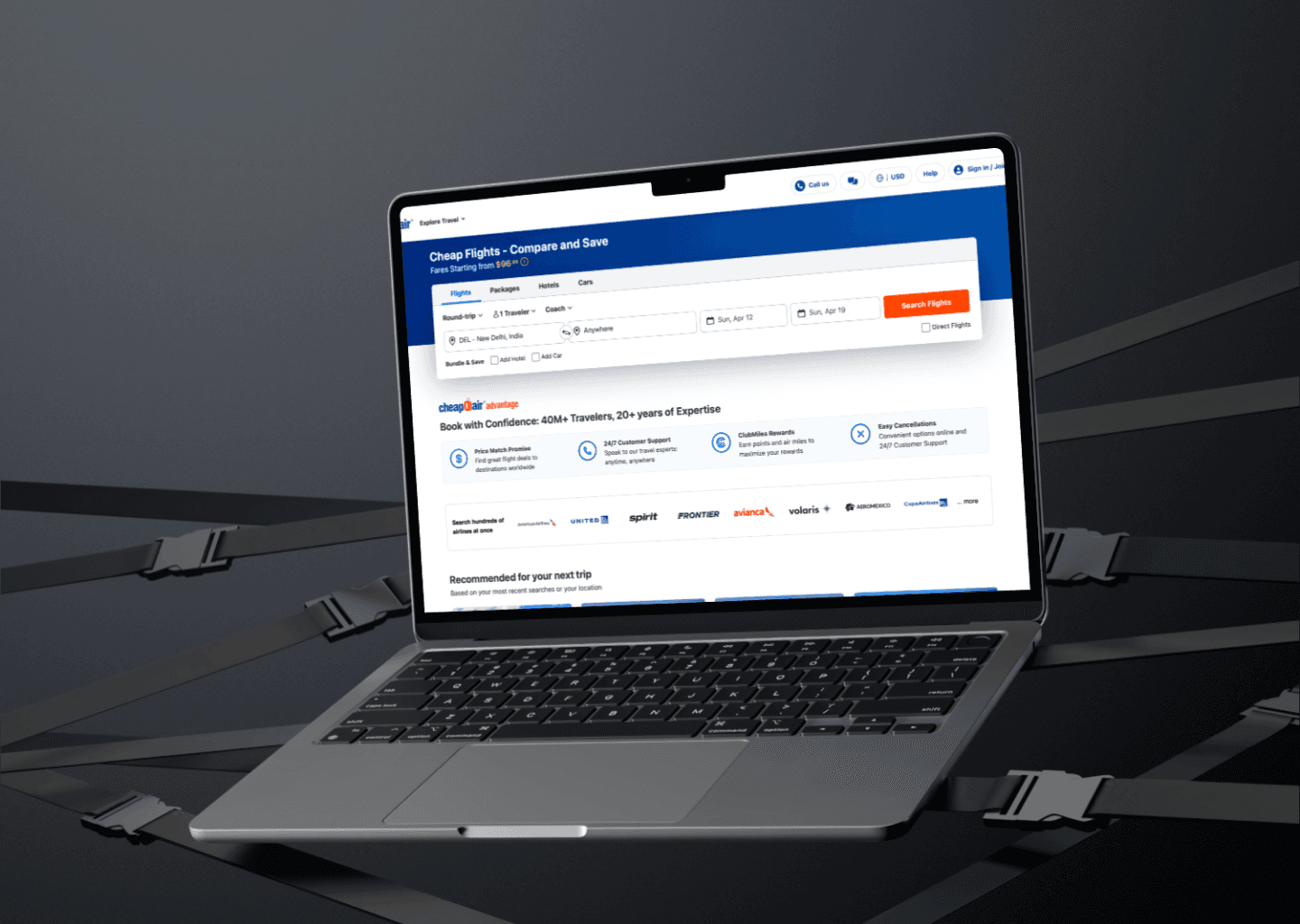
CheapOair has been around since 2005. It's part of Fareportal, sits alongside Expedia and Priceline in the OTA space, and has built a clear identity around one thing — budget travel. Last-minute flights, competitive fares, and a live agent you can call when a booking gets complicated. The platform attracts 5.5 to 5.9 million monthly visits. That's a significant volume of people who've actively chosen to trust it with a real financial decision.
When TransOrg Analytics was brought in for a UX engagement, my brief was focused and specific. I wasn't auditing the full product. I was looking at one thing: the guest user experience — from the moment someone lands on the site with no account, to the moment they complete or abandon a booking. No post-login flows, no registered user states. Just the raw, unassisted journey that every first-time visitor goes through.
That journey touched six key pages: Landing, Flight Search, Search Results, Flight Details, Seat Selection, and Review and Booking. Across three platforms — desktop web, mobile web, and iOS and Android apps.
Company
CheapOair
Industry
Travel
My role
Solo UX Auditor
Timeline
Under 2 weeks
Team
Data Scientists (2), Product Designer, UI/UX Designer (1)
Problem Statement
Picture this. A user spots a cheap fare on CheapOair, clicks through, starts filling in their traveler details, gets to the payment screen - and leaves.
Not because the flight got more expensive. Not because they changed their plans. But because somewhere in that 10-minute journey, something made them feel like they couldn't trust what they were about to pay for.
That's the scenario that was playing out thousands of times a day. And for a platform pulling in nearly 6 million monthly visits, even a small shift in checkout trust translates directly into revenue.
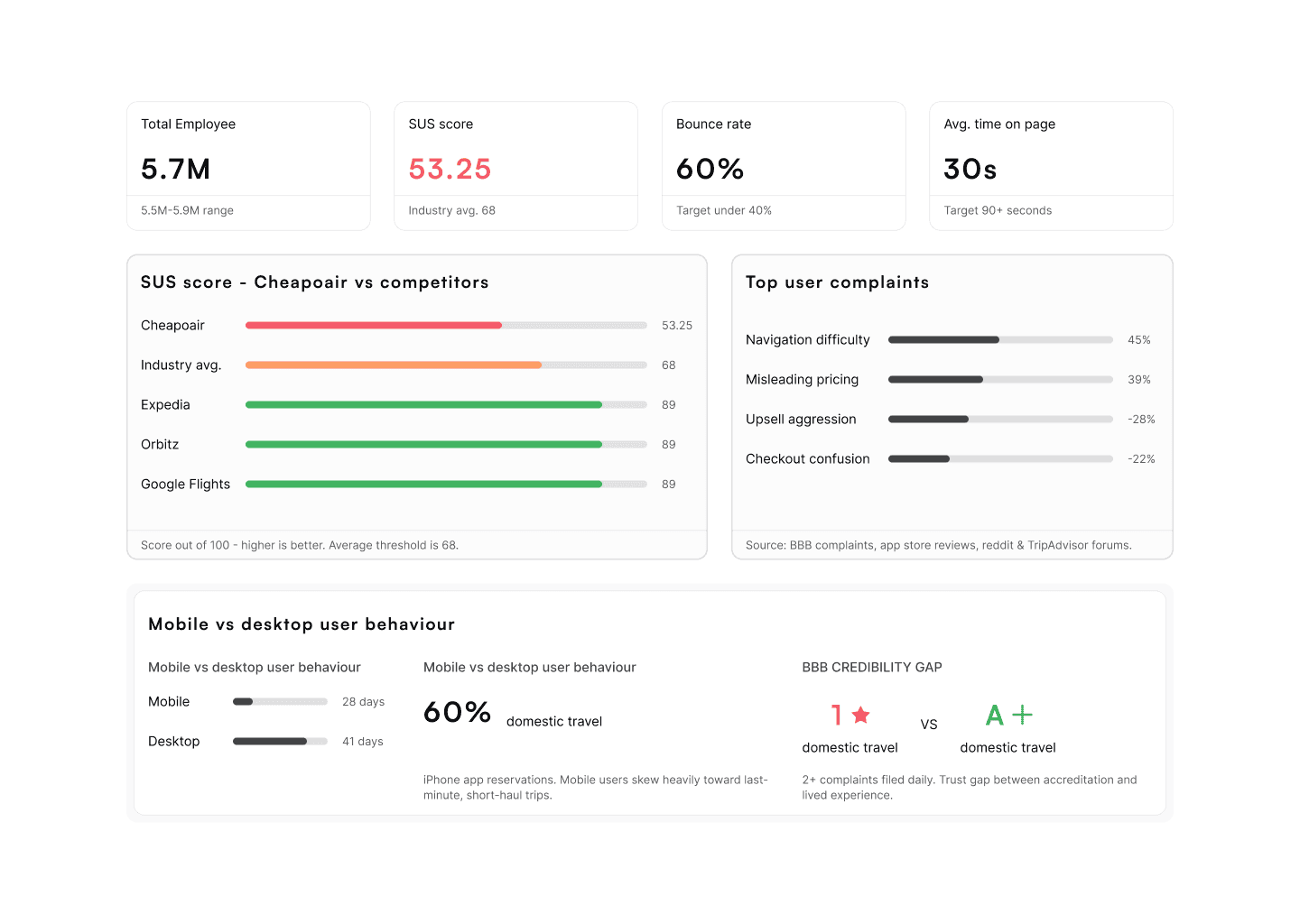
The data backed it up. 39% of users flagged misleading pricing as their biggest complaint. 45% said navigation was their primary frustration. Despite holding an A+ BBB accreditation, the platform carried a 1-star customer rating on the same bureau.
And then there was the usability score. CheapOair scored 53.25 on the System Usability Scale. The industry average is 68. Competitors like Expedia, Orbitz, and Google Flights sit around 89. That 35-point gap isn't a UI polish problem. It points to something structural — a booking flow that was creating friction and eroding trust at multiple points, compounding with every page the user moved through.
The question I needed to answer wasn't "what looks bad." It was: where exactly is trust breaking down, and what is pushing users out of the funnel right before they pay?
The Solution
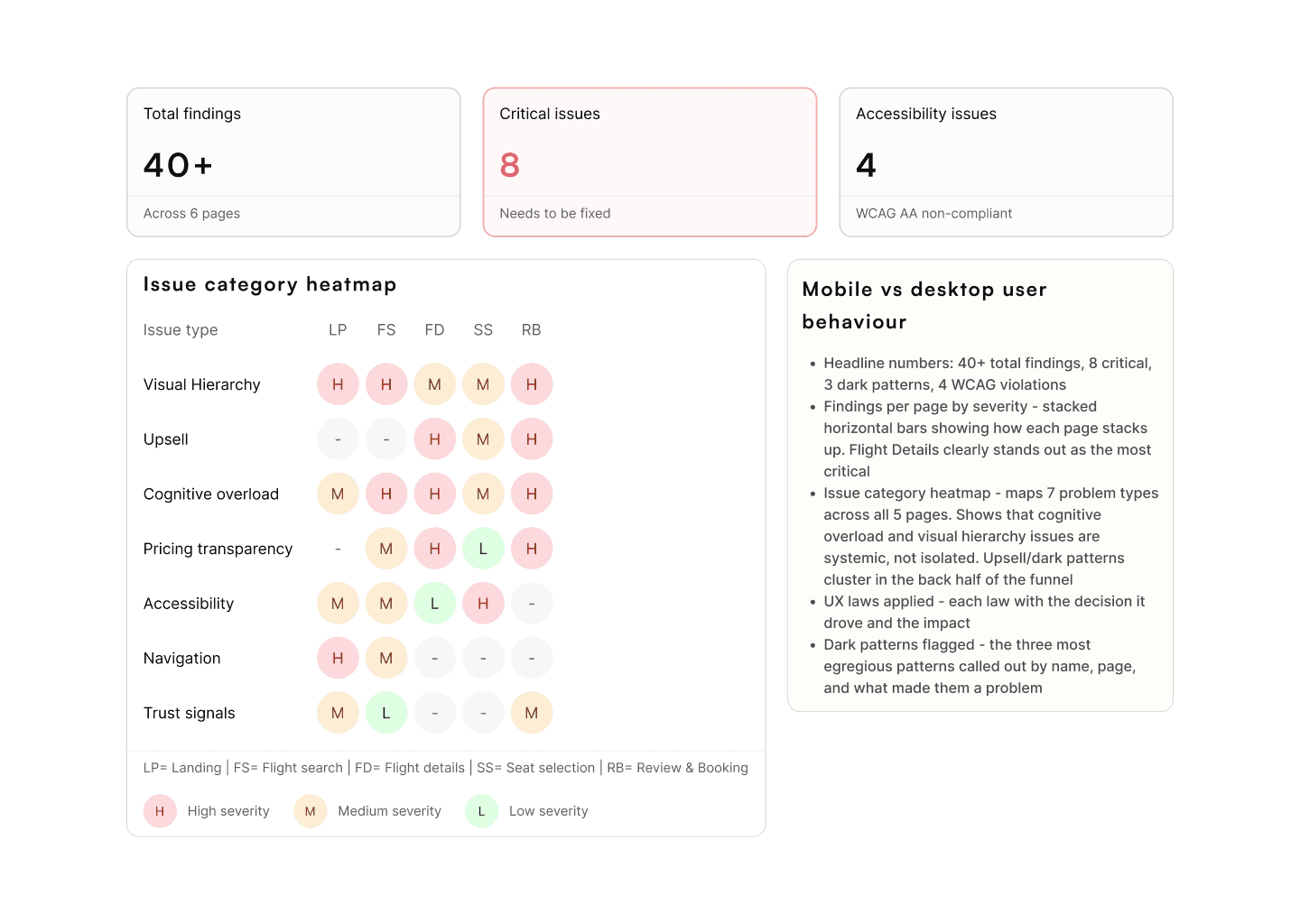
The audit produced three things: a prioritized findings report with 40+ annotated issues across six pages, a competitive analysis benchmarking CheapOair against 15 global and regional OTAs, and a four-pillar strategic design framework to guide the redesign.
The four pillars were:
1. Trust Rebuilding Through Transparency - Address the pricing confusion with clear fee breakdowns and a 48-hour price guarantee.
2. AI-First Data Transparency - Surface price source, timestamp, and real-time availability to eliminate ghost fare confusion.
3. Booking Flow Simplification - Replace the overwhelming multi-element pages with progressive disclosure and single-focus screens.
4. Agentic AI Support Integration - Reduce the 60-minute support wait times through a self-service support hub.
Expected business impact from the strategy: 2-3x conversion improvement, 25-35% reduction in abandonment, 40% reduction in pricing-related support tickets.
Research and Insights
Two weeks is a tight window for an audit covering six pages across three platforms. I had to make deliberate choices about where to go deep and where to move fast.
One advantage I had going in: CheapOair is a well-documented product. Years of public complaints, app store reviews, usability studies, and competitor teardowns already existed. I didn't need to build the picture from scratch. I needed to synthesise e it quickly and point it at the right questions.
How I built the picture:
Google Analytics and Hotjar showed me where users were dropping off and where they were getting stuck. Rage-click patterns and scroll drop-off data directed me toward the pages that needed the deepest scrutiny before I'd looked at a single screen in detail.
The competitive analysis covered 15 OTAs - a mix of global players like Expedia, Booking.com, Hopper, and Skyscanner, and Indian OTAs like MakeMyTrip, ClearTrip, and EaseMyTrip. I evaluated each across product positioning, search and filtering usability, checkout friction, heuristic compliance, and UI approach. This wasn't background research that sat in a slide. It became the benchmark I held every CheapOair finding against.
For the heuristic evaluation, I walked every page as a guest user — slowly, with fresh eyes — and assessed it against Nielsen's 10 usability heuristics. Every issue got a severity rating: Needs to be Fixed, Needs Improvement, Good, or Idea.
Then there were the reviews. BBB complaints, App Store and Play Store ratings, Reddit threads, TripAdvisor forums. Real users, in their own words. This is where I found the emotional texture of the problem — not just what was broken, but how it felt to live through it. No survey produces language like "felt like a bait and switch" or "I didn't know what I was actually paying for until the last screen."
What the research kept pointing to:
The competitive analysis surfaced a pattern that turned out to be the central insight of the entire audit. Hopper, ClearTrip, and EaseMyTrip all have fewer features than CheapOair. But they outperform it on checkout completion. Not because of capability - because of restraint. They present one decision at a time. They move upsells out of the critical path. They treat the booking form as the primary task, not something buried beneath promotional content.
CheapOair was doing the opposite. Upsells appeared before traveler details were filled in. Promotional blocks interrupted the results flow. Fear-based copy sat between the user and the form they needed to complete. To borrow the language straight from user reviews: trying to book a flight felt like being sold five other things at the same time.
Hotjar confirmed this with behavioral data. The highest rage-click density in the entire funnel was concentrated on the fare upgrade comparison table and the promotional section on the Flight Details page - exactly where users were looking for a way to move past something they didn't want, and couldn't find one clearly.
Process
The audit was structured in three phases:
Phase 1 - Scope and Benchmarking (Days 1-3)
I started by locking down the scope precisely with the client. Guest users only, pre-login, all three platforms. Getting this agreed upfront matters more than it sounds — scope ambiguity in a two-week audit is how you end up with shallow coverage everywhere and sharp insights nowhere.
Then I built the competitive matrix. Fifteen competitors across six evaluation dimensions. This wasn't a deliverable for the client — it was a working tool for me. Every recommendation I made later was grounded in something a competitor was already executing better. That approach makes findings more credible and harder to dismiss.
Phase 2 - Page-by-Page Audit (Days 4-10)
I went through each page the way a real guest user would. No shortcuts. No skipping the sections that felt familiar. Every finding went into a structured spreadsheet: the problem, where it appeared, who it affected, why it mattered, and what a better direction looks like. Severity rating attached to each one.
Then came the Figma annotation layer — screenshots of every page with numbered callouts, each one mapped to a corresponding finding. The goal was a report that a product manager or developer could read and act on independently, without me needing to walk them through it.
Phase 3 - Strategy and Prioritisation (Days 11-14)
An audit that produces a long list of problems without a point of view on what to address first isn't that useful. The real risk at this stage is delivering a document that overwhelms instead of guides.
I grouped all findings by theme, identified the four structural problems running beneath the surface-level issues, and built the strategic framework around those. Prioritization was always impact-first — not what was easiest to fix, but what was actively costing the business bookings right now.
Execution
This was an audit, not a redesign. So execution here means the quality of thinking behind each finding - how precisely I identified the problem, why it matters for the business, and what a better path forward looks like. That's the work. That's what the client needed.
Landing Page
The page tries to do everything at once, which is exactly why it doesn't do any single thing well.
The top bar was the first place I paused. Logo, phone number, "more travel," "deals," "my account," and two separate account actions (sign in and join) - all compressed into a single horizontal strip. No visual hierarchy. Nothing guiding the eye toward a starting point. Nothing telling a new visitor where to begin.
The search module below made it worse. A promotional banner, offer tags, and multiple form fields all competing for space in the area where users needed one clear thing: a search input. The above-the-fold area was so visually dense that the primary action - searching for a flight - was genuinely hard to identify at a glance.
The finding I kept returning to: the navigation tabs weren't sticky. On any flight booking platform, search should stay accessible as users scroll. Expedia does this. MakeMyTrip does this. Hopper does this. When a user scrolls down to browse deals or explore destinations and then wants to modify their route, they have to scroll all the way back to the top. It's a small friction point - but it plays out across millions of sessions and compounds the overall effort the platform asks of its users.
Flight Search Page
The search summary bar at the top of this page held eight or more interactive elements in a single row - route, dates, traveler count, cabin class, fare alert toggle, promo badges, and a modify search button - all at roughly equal visual weight. The most important information (where you're flying and when) didn't stand out from the secondary items. Users had to actively work to read the bar, which is the opposite of what a navigation element should ask.
Immediately below that sat the "Get Fare Alert" banner. A large, blue, full-width block - positioned above the flight results. This is the most valuable real estate on the page, and it was occupied by a secondary promotional action. Users arrived here to see flights. That's the only job this page has. Placing a sign-up prompt in front of the results is a direct interrupt of the task flow.
The flight result cards were the deepest problem on this page. Airline name, times, duration, stops, price, CTA, baggage tags, guarantee banners, promotional badges - all packed into a tight horizontal layout at equal visual weight. When everything competes for attention, nothing actually gets it. Users trying to compare options across cards had no clear visual anchor to help them scan quickly.
Flight Details Page
This was the most severe page in the audit. The combination of issues here directly explains the drop-off happening right before checkout.
The fare upgrade comparison table came first - before the traveler details form. To compare fare tiers, a user had to process a dense multi-row, multi-column table across both departure and return flights simultaneously. Most users scrolled past it without engaging. But the cognitive load of encountering it still registered. The recommendation: move fare options to appear after traveler details, or collapse the table by default and let users expand on demand. Progressive disclosure, not front-loaded complexity.
After the fare table came the travel protection section - and this is where the dark pattern was most explicit. The opt-in button ("Yes, add travel protection") was styled more prominently than the skip option. The copy leaned on fear: bad weather, trip interruptions, unexpected disruptions. The opt-out path was deliberately quieter. That's not persuasion - it's pressure. And users notice, even when they can't name exactly why something felt uncomfortable.
Then came a testimonial block with stock imagery and promotional bullet points, placed directly between the upsell sections and the actual traveler form. By the time a user finally reached the form to enter their passenger details, they had already scrolled through a fare comparison table, a travel protection upsell, and a testimonial section. The form should be the centrepiece of this page. Instead, it felt buried and deprioritized.
Seat Selection Page
The seat map carried the most serious accessibility issues in the entire audit.
Touch targets were too small for reliable interaction on mobile. The seat types - preferred, standard, and unavailable — were differentiated by shades of blue that were too similar to tell apart without looking closely. There were no hover states, no ARIA cues for screen readers, and no pricing information in the legend. Users couldn't see how much a preferred seat would cost until they actually tapped on one.
The session timer running alongside the seat map made everything worse. Seat selection is a moment that requires thought - checking window versus aisle preferences, accounting for a travel companion, comparing prices. The timer turned that considered decision into a timed sprint. Anxiety at this stage of the funnel doesn't help conversion. It works directly against it.
Review and Booking Page
The final checkout page was the most crowded screen in the flow - which is exactly the wrong moment to crowd a user.
The payment form shared space with an Affirm buy-now-pay-later section, a third appearance of the travel protection upsell, a car rental cross-sell, and a promo code input field. Every single one of these elements competed with the primary task: entering payment details and confirming the booking.
The promo code field deserves its own mention because its effect on conversion is well-documented. A user who sees a promo code box will often pause, open a new tab to search for a coupon code, and simply not return. It is a self-inflicted drop-off, placed at the single most critical moment in the entire funnel.
The price breakdown didn't clearly separate the base fare, taxes, and service fees. Users arrived at the total without a clear understanding of what they were committing to. That final moment of ambiguity - right before a financial decision — is where trust collapses and bookings are abandoned.
Usability Testing and Validation
Formal usability testing wasn't in scope for this engagement. But I also wasn't comfortable letting findings rest purely on heuristic judgment. So I triangulated across three sources before finalizing any recommendation.
Hotjar session recordings gave me behavioral confirmation. The rage-click patterns I had flagged through heuristic evaluation — concentrated around the fare upgrade table and the promotional block on the Flight Details page — showed up clearly in the data. Users weren't just confused. They were actively struggling to find a way forward.
App Store, Play Store, and BBB reviews gave me something harder to quantify but equally important: the user's own voice. When the phrases in public complaints map directly to what a heuristic audit identifies — "price changed at checkout," "felt like I was being tricked," "couldn't figure out how to skip" — you're not looking at a design opinion. You're looking at a confirmed structural problem. The two sources validated each other clearly.
Competitive benchmarking anchored every recommendation in real evidence. If I was suggesting a change, I needed a reference point for why it would work. Hopper and ClearTrip provided the benchmark for checkout simplification. Expedia and Booking.com set the standard for trust signals and filter usability. Nothing in the strategy was speculative — every direction pointed at something a competitor was already executing successfully, at scale.
Final Outcomes and Impact
The engagement delivered three things the client's team could act on immediately.
A prioritized findings report with 40+ annotated issues across six pages, each with a severity rating, a clear rationale, and a recommended direction. A 15-competitor benchmarking analysis covering every dimension of the guest booking experience. And a four-pillar strategic redesign framework, scoped into a 1-month quick-win plan for the Landing Page and a 6-month full-product transformation roadmap.
Some findings moved into implementation after the engagement. The full scope of what was built wasn't reported back — a common outcome when audit and execution teams operate separately. What I know is that the team walked away with a clear, prioritized foundation rather than an undifferentiated list of problems. The strategy was designed to be executable, not aspirational.
What I'd Do Differently Next Time
I'd find a way to observe at least one real user session. Hotjar recordings and public reviews are genuinely useful, but there's a specific quality of insight that only comes from watching someone navigate a product for the first time — the small hesitation before a tap, the moment they re-read something twice, the quiet decision to give up and close the tab. Those moments don't surface in analytics. Even two or three observed sessions would have sharpened how I prioritized findings and where I invested the most scrutiny.
I'd build a personal tracking layer from the start. When audit findings get implemented incrementally over months, it's easy to lose the thread of what actually moved. Keeping a lightweight log — original finding, recommended change, observed outcome — would let me build genuine before-and-after evidence over time. That evidence makes future work sharper and future case studies more honest than relying on metrics the client defines and you never see again.
I'd spend more dedicated time on mobile. The audit covered all three platforms, but mobile deserved a standalone, more rigorous pass. The seat map interaction, the form behavior on smaller screens, the tap target issues — these aren't minor details. Given that 76% of CheapOair's app bookings are domestic travel, mobile is where the real conversion opportunity lives. It's where I'd go deeper next time, and where I'd push to include at least one round of real-device testing.